
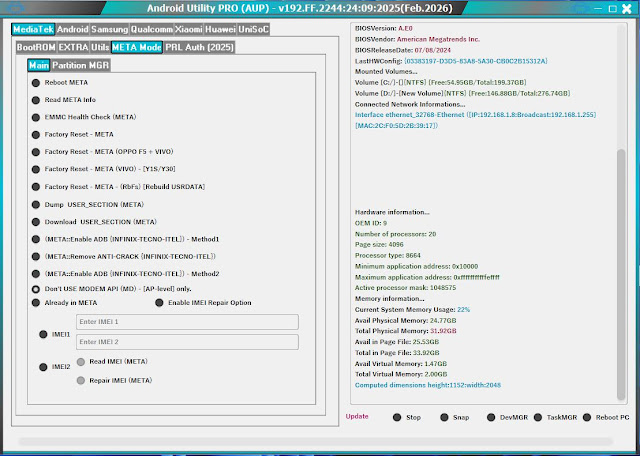
Android Utility v200 (No Card Edition) – Official Update
The latest Android Utility v200 (No Card Edition) has arrived. This powerful tool is a must-have for mobile technicians, offering a one-stop solution for bypassing security locks, flashing firmware, and repairing Android devices. As a “No Card” version, it requires no hardware dongle or smart card, making it accessible for everyone to use on MediaTek, Qualcomm, and Samsung chipsets.
🔥 New Features in v200
Universal MTK Support: Enhanced Auth Bypass for the latest MediaTek chipsets, supporting VIVO, OPPO, and Realme factory reset and bootloader unlocking.
Samsung FRP 2024/2025: Improved “Test Mode” (*#0*#) functionality for removing Google Account locks on the latest security patches.
Xiaomi Sideload Tool: Format Userdata and Reset FRP via Sideload mode without needing to unlock the bootloader.
Qualcomm EDL Operations: Improved XML flashing and partition management for Snapdragon-based devices.
Main Capabilities
- Force BROM mode for MediaTek devices.
- Dump Preloader / Read Info in Meta Mode.
- Fix “DL Mode” and Bootloop issues.
- Disable PayJoy and MDM Locks (Selected Models).
- One-click Bootloader Unlock/Relock.
How to Install & Use
- Extract: Use WinRAR to extract the downloaded file to your Desktop.
- Drivers: Ensure you have LibUSB, MTK, and Qualcomm drivers installed.
- Disable Protection: Temporarily turn off Windows Defender or Antivirus.
- Run: Open the “AndroidUtility.exe” as Administrator.
- Connect: Choose your function and connect your device in the required mode.
Download Android Utility v200
Click the button below to get the official No Card Edition setup.
Warning: This software is for educational and repair purposes only. Use it at your own risk.